Laytur

Save it now.
Get it back later.

Links, recipes, places, videos and screenshots, saved from any app in one tap. Laytur brings each one back when you have time for it, or when you get there.

Free to use. Laytur Pro is a one-time $4.99. No subscription, no ads.

Laytur's list: saved links with reminders, recipe and product tags

A read-later app that actually brings things back.

Most saved links are never seen again. Laytur asks one question when you save, then gets out of the way until it's time.

Pick when, or where.

Tonight, this weekend, tomorrow morning. Or when you get to work, get home, or walk past that restaurant you saved.

  • Snooze straight from the notification: 20 minutes, an hour, tonight, the weekend
  • Spots deadlines on the page, like a sale ending or tickets going on sale
  • A weekly round-up of what's still waiting
Saving a link: remind me tonight, tomorrow, this weekend, or at work

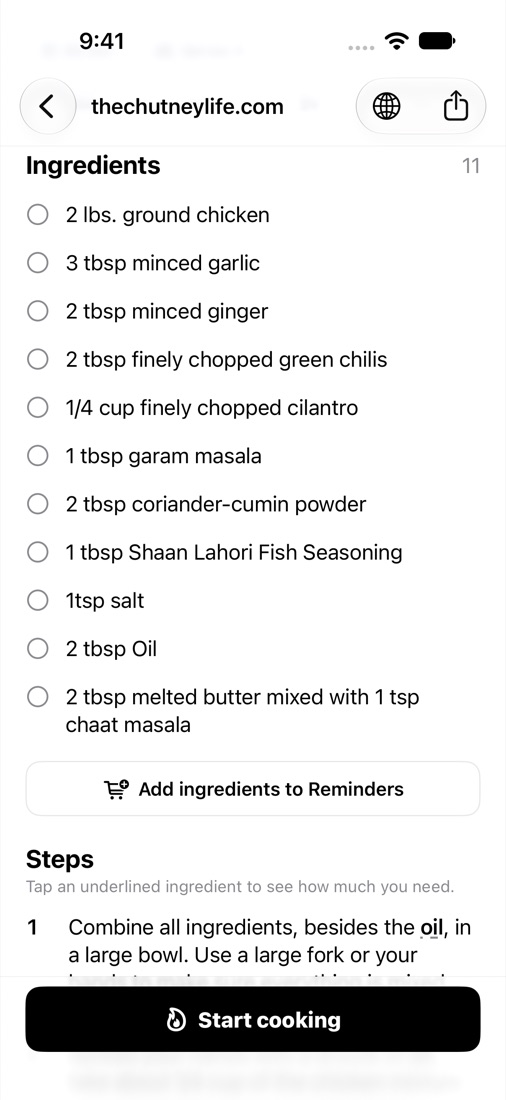
Recipes, without the life story.

Save a recipe from a blog, TikTok, Instagram or YouTube and open just the ingredients and steps.

  • Scale it for more people, and tap an ingredient in a step to see how much
  • Cook mode keeps the screen on, one step at a time, with timers
  • Add the ingredients to your Reminders shopping list
A saved recipe's ingredients as a clean checklist

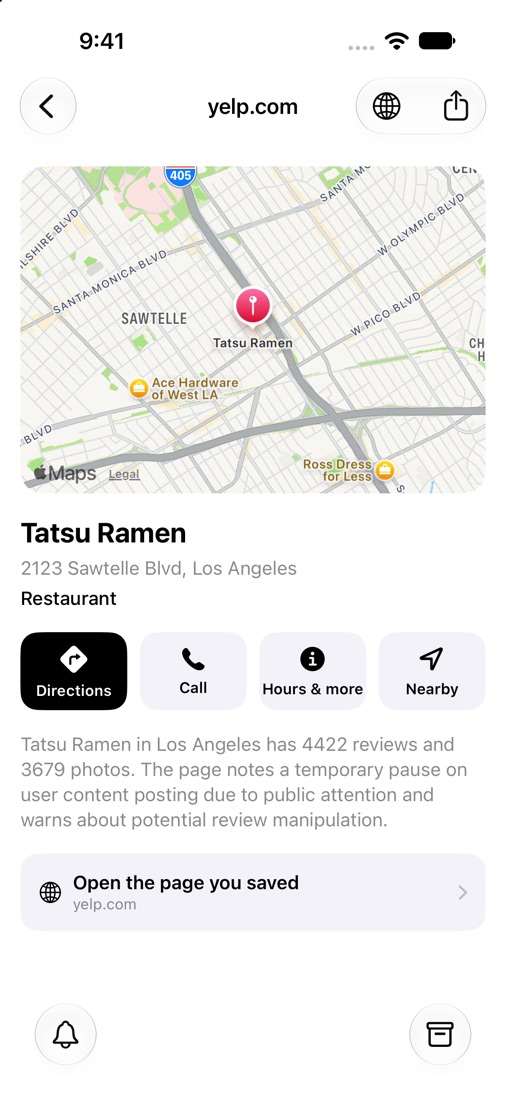
Places open as places.

A restaurant from Yelp, a shop from Google Maps, a café a friend texted you. Laytur shows where it is and how to get there.

  • Map, distance, directions and a call button
  • Hours and photos from Apple Maps
  • “Remind me when I'm nearby”
A saved restaurant as a card with a map, directions and call buttons

Everything else you'd hope for.

Built for the way people actually save things.

Save from anywhere

Share → Laytur in Safari, TikTok, YouTube and every other app. Or paste a link.

Screenshots count

Save a screenshot of a recipe, product or place. Laytur reads it on your iPhone and files it properly.

Pick up where you left off

Reading time for every article, and it opens right where you stopped.

✦ Summaries on your iPhone

A short summary, key points and tag suggestions, written by Apple Intelligence on the device.

iPhone, iPad, Mac & the web

Your list stays in sync, live. Open it on any computer at laytur.com/app, or save pages from Chrome.

Private by design

No ads, no tracking, no analytics. Your location and your places never leave your device.

Free, with a one-time Pro.

Pay once and it's yours. Try three recipes or places free first.

Laytur

Free

Everything you need to save and come back.

  • Save from any app, paste, screenshots
  • Time reminders and snooze
  • Tags and search
  • Reading time and pick up where you left off
  • Automatic backup

Laytur Pro

$4.99

Once. No subscription.

  • Recipe view and cook mode, even from videos
  • Place cards with maps, directions and hours
  • “When I get to work”, “When I'm nearby”, and the weekly round-up
  • ✦ Summaries, key points and smart tags
  • Sync across iPhone, iPad and Mac
  • Your list on any computer at laytur.com/app

US price shown; the App Store shows your local price.

Support

Questions, bugs or ideas: email me@shabz.co. A person reads every message.

I've used Laytur before. Do I lose my links?

No. Update Laytur from the App Store and open it. Your links, archived ones included, come over on their own; there's nothing to sign in to. Anything you saved in the meantime is kept, and nothing is duplicated.

How do I save from another app?

Tap Share in Safari, TikTok, YouTube, Instagram or any app, then Laytur. If you don't see Laytur, scroll to the end of the row of apps, tap More, and add it. Screenshots work the same way.

How do I get my links on my Mac, iPad or another computer?

On a Mac or iPad, sign in with Apple in Settings → Account (part of Laytur Pro), and changes show up within seconds. On any computer, open laytur.com/app and point your iPhone's camera at the code it shows. No password needed.

How do I set up the Chrome extension?

Add Laytur to Chrome, then in the Laytur app go to Settings → Browser extension → Connect Chrome and enter the code the extension shows. Or just point your iPhone's camera at the extension's QR code.

I bought Pro. How do I get it on another device?

Pro is tied to your Apple Account. On the other device, open Settings in Laytur and tap “Already bought it? Restore purchase”.

Why don't I see ✦ summaries?

They're written by Apple Intelligence on the device, so they need an iPhone, iPad or Mac that supports it, with Apple Intelligence turned on, and Laytur Pro.

How do I delete my data?

In Laytur, go to Settings → Account and tap Delete backup (or Delete account if you signed in with Apple). Your links are removed from our server; deleting the app removes them from your device. Or email us and we'll do it for you.